UniFi Network Application 10.6.97

Overview
UniFi Network Application 10.6.97 adds Drift Inspector, Topology Spotlight, and expanded Safe Ops features, along with the improvements and bug fixes listed below.
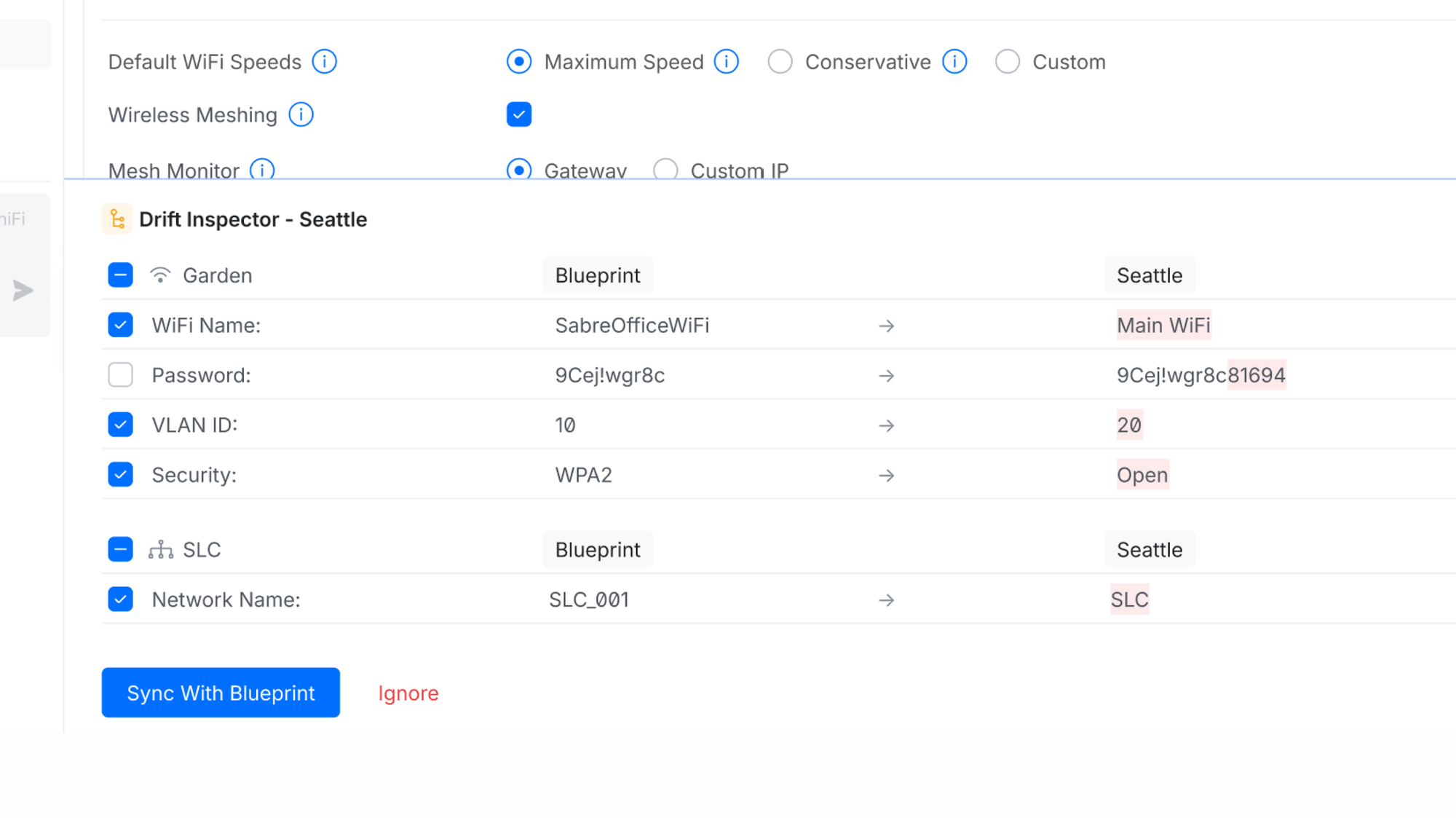
Added Drift Inspector to Blueprints in Site Manager
Make local changes to sites using Blueprint orchestrations, with a clear view of configuration drift and an easy way to resolve it.
Added Topology Spotlight
Quickly highlight and filter selected devices for easier navigation and troubleshooting in large topologies.
Improved SafeOps features
Expanded Test & Confirm support to VPN and Management networks.Added Nightly Channel AI Optimization with configurable radio selection and an improved optimization algorithm.
Improved Time Machine Experience
Added Time Machine for Radios to review radio usage metrics, configuration changes, and radio events from the past 24 hours.Expanded Port Manager Time Machine to All Ports, making it easier to identify and troubleshoot problematic network segments.
Improvements
Added a flapping devices filter to Port Manager Time Machine for clients with frequent reconnections.Added the Reduced Firewall State Timeouts profile for EFG, EF-Core, and UXG-Enterprise.Added a confirmation prompt when updating all devices from the Devices filter side panel.Added sorting to Network Lists and descriptions on hover.Added column sorting to tables in Settings Overview.Added an Allow Empty Password option for RADIUS MAC Authentication.Added the ability to disable the LCM screen on meshed UX7 devices.Added Sort by Topology to the Devices page.Added a notice for unsupported devices in Test & Confirm settings.Added a disabled port filter to Port Manager.Added an Additional Labels option to Infrastructure Topology.Added a warning in Topology when Sonos devices with mixed wired and wireless connections are detected.Added validation to prevent OpenVPN Server and Site-to-Site VPNs from using the same UDP port.Added a Spotlight selection option in Topology.Added the ability to disable insecure OpenVPN compression.Added Multicast Suppressor support.Requires UAP 8.8 or newer.Added a Lock Port to UniFi Device option to Port Manager.Requires Switch firmware version 7.6 or newer.Added support for adopting multiple U5G devices on the same site over LAN.Added support for using Domain Network Lists in QoS Policies.Added support for customizing WAN interfaces used for Automatic Speed Tests.Added Bulk Update Management to the Devices page.Improved Device Auto-Recovery stability.Improved Data Plane Protection resiliency.Improved Traffic Activity Statistics accuracy.Improved the Observability section.Improved the device revert experience by allowing easy reversion for all devices with the same Device model and version.Improved DHCP Options validation.Improved the Dynamic DNS settings user experience.Improved RADIUS settings validation.Improved Virtual Network management in Topology.Improved the AV Manager user experience.Improved Honeypot validation.Improved the display of unstable links in Infrastructure Topology.Improved network subnet validation against static route destinations.Improved Port Profiles management in Port Manager.Improved Port Manager by automatically opening Time Machine.Improved the Device Update confirmation screen by showing the number of connected devices that might be interrupted.Improved OpenVPN server configuration files by removing periodic TLS key renegotiation.Requires UniFi OS 5.1 or newerImproved VPN Server settings validation.Improved application startup resiliency.Improved the Port Forwarding table user experience.Removed the STP Edge note from Port Manager when Auto STP Edge is disabled.Separated the Reset Stats and Clear Last Seen Device actions in Port Manager.Enabled DHCP Guarding by default on new networks.
Bugfixes
Fixed an issue where client devices with a configured Power Source could be automatically enrolled in Device Auto-Recovery.Fixed an issue where the AP Stopped Mesh system log could be generated repeatedly after an AP switched to a wired uplink.Fixed an issue where the High Traffic alarm incorrectly reported wireless client downloads as uploads.Fixed an issue where SD-WAN Mesh VPN tunnels could remain after the configuration was removed.Fixed an issue where the client count in the WiFi Broadcast overview was incorrect when MLO clients were connected.Fixed an issue where filter counters could flicker on the Connectivity page in rare cases.Fixed an issue where the hostname was not set correctly for a UX7 connected via mesh.Fixed an issue where a custom APN could be lost after moving a SIM between slots on a U5G.Fixed an issue where the UX7 did not display connected wireless clients in the Devices list.Fixed a rare issue where opening Client Observability could impact system stability.Fixed an issue where DAS/DAC (CoA) was unavailable when using Open security with RADIUS MAC Authentication.Fixed an issue where MC-LAG configurations could be lost after restoring a backup.Fixed an issue where the Connectivity page was missing some roaming events.
Additional information
UniFi OS Server
Going forward, we recommend users upgrade to UniFi OS Server for all self-hosted deployments. It provides the full UniFi OS Platform experience, ensuring you receive the latest features, improvements, and integrations.
UniFi Network Native Application for UniFi OS
Compatible with UDM, UDR, UDR7, UDR 5G Max, Express, Express 7, and UCG models (Ultra, Max, Fiber, and Industrial) on UniFi OS 3.1.6 or later. UDM-Pro, UDM-SE, and UDW have been using it since UniFi OS 5.1.5.
The UniFi OS update utilizes the application version compatible with your console.The manual update process via SSH requires a compatible package. Incompatible packages will be rejected on installation.Older UniFi OS versions (prior to UniFi OS 3.1.6) on the UDM and UDR continue to utilize the standard UniFi Network Application for UniFi OS.
Checksums
3c61771b272fce0dc4d885b27f5aacc3 | UniFi-installer.exe
a7e03c2267472a2ca92e08757af3664e | UniFi-Network-Server.dmg
edb6f32f292e5a1746c0759c3381d91c | UniFi.unix.zip
05a81e3c1e56c9bdb93b9e3203804441 | unifi_sysvinit_all.deb
14c2556535e87d5fbbb2331573455051 | unifi-uos_sysvinit.deb
4561503f51df61ab44bb793f45cf4641 | unifi-native_sysvinit.deb
601df32736f41e40a80a3e472450a3e1 | unifi_sh_api
————————————————————————————————————————
0a8bac122b9ff697fdbf1f591acaee20871fe8c2b3080ece50264fc8bd0014e3 | UniFi-installer.exe
8a60ce8b69575777e7f983642368a49c04f5a995dc78bda84ca74d16557c680d | UniFi-Network-Server.dmg
9d50b389b418c0007c4ad234b8d0e608150c2a88aabb1ab9b1f12394f489e3d3 | UniFi.unix.zip
a03edb46d0d1df8edd517c07d80588addf62799493a4b20846317705620fe5cc | unifi_sysvinit_all.deb
c6ff500ba2d21c99097fa3be89041965d4e90c76f90e0f4722855827319ce47c | unifi-uos_sysvinit.deb
ada60aa072c880df48f0d1f7cc5c4134fef20a6e501e1f56ecc075a4e5953a06 | unifi-native_sysvinit.deb
1791685039ea795970bcc7a61eec854058e3e6fc13c52770e31e20f3beb622eb | unifi_sh_api
Leave A Comment