UniFi Network Application 10.5.54

Overview
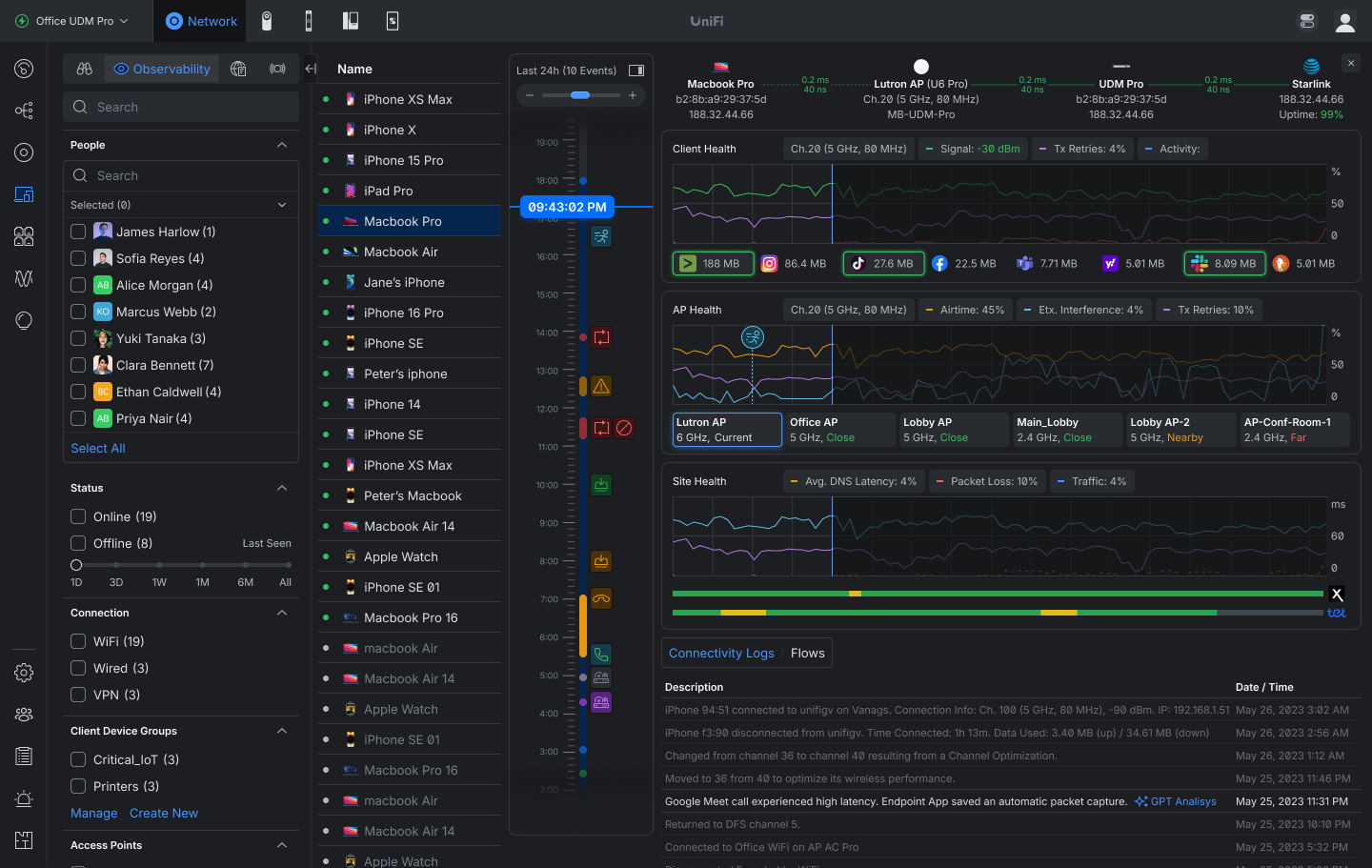
Client Observability
Gain complete visibility into client behavior with a 24-hour activity timeline that correlates connectivity, roaming, application usage, and network health into a single troubleshooting experience.
Review a 24-hour time machine of client activity and events.Track connection quality with signal strength, TX retries, latency, and packet loss.Analyze roaming history and access-point performance affecting the client experience.
Safe Ops
Safe Ops introduces proactive protection and recovery mechanisms designed to reduce outages, maintain connectivity, and improve operational resilience across UniFi deployments.
Added Auto STP Edge that automatically sets ports connected to end devices as Edge.Added Link Debounce controls to reduce link flapping caused by brief interruptions and unstable connections.Requires USW 7.5.4 or newer.Added Test & Confirm safeguards that automatically roll back changes if device connectivity is lost after configuration updates.Available for Internet and Network settings. Wider support coming soon.Requires UniFi OS 5.1.12 or newerAdded Data Plane Protection.Enhanced Device Supervisor with global Auto-Recovery controls, including configurable health monitoring and recovery thresholds.
Improvements
Added Domain and Description fields to Network Lists.Added Local Subnet configuration for policy-based IPsec Site-to-Site VPNs.Added an “Advertise BGP to SD-WAN” option in BGP settings.Added PPPoE 1500 MTU support.Added a Duplicate action for Firewall Policies in the Policy Table.Added Firewall Hit and Last Hit columns to the Firewall Policy table and predefined policy side panel.Added column customization to the Radios page.Added column sorting to Settings Overview.Added sorting to OSPF and BGP neighbor tables.Added warnings for client devices using private MAC addresses.Added a warning when changing 6 GHz radio settings on an MLO mesh parent.Added a Person filter to the Clients page.Requires One-Click WiFi.Added APs with wired downlinks to Infrastructure Topology.Added uplink change and device update events to Infrastructure Topology.Added third-party device connection events to the Infrastructure Topology timeline.Added Last Seen information to anomaly tooltips in Port Manager.Added customizable Power Cycle on Internet Loss behavior with configurable delay and single-cycle recovery per outage to prevent repeated modem resets during prolonged WAN outages.Added a Hardware Acceleration option for UDM Beast.Added an infrared status indicator for EAV Bridge.Requires firmware version 1.0.9 or newer.Added migration support from Suricata 6 to Suricata 8.Requires UniFi OS 5.1.20 or newer.The upgrade may take up to 1 hour after updating the Network Application.On consoles with high resource usage, the automatic upgrade is skipped, and a manual upgrade option is available in CyberSecure settings.Improved device adoption resiliency.Improved Network Application stability under high load.Improved the VPN settings user experience.Improved VPN client configuration validation.Improved validation when configuring BGP.Improved IPsec policy-based routing configuration by excluding WireGuard and OpenVPN clients from Local Network selection.Improved the offline device experience in Topology.Improved the STP Blocked experience in Infrastructure Topology.Improved Infrastructure Topology timeline events by grouping cascading device offline and online events while clearly identifying the top uplink.Improved the U5G device side panel with more detailed status information.Improved database upgrade resiliency against power loss.Improved Hardware Acceleration validation to check only when Smart Queues or QoS are enabled.Improved the CyberSecure section user experience.Increased the EFG IDS/IPS VLAN limit from 25 to 64.Reduced U5G eSIM data usage from WAN monitoring.
Bugfixes
Fixed an issue where WPA Enterprise SSIDs could fail to broadcast when using a stale RADIUS accounting secret.Fixed an issue where the Virtual Network Override limit was applied to clients that did not have the feature enabled.Fixed an issue where LTE Pro Failover could fail in rare cases.Fixed an issue where sorting by Available IPs in Network settings did not work.Fixed an issue where restoring a backup disabled hardware offloading on supported consoles.Fixed an issue where USW Flex downlink devices could display an incorrect uplink in rare cases.Fixed an issue where Captive Portal and internet access did not work on UX7 guest networks using non-Hotspot WiFi.Fixed an issue where device name changes were not reflected in Update Manager while the device was offline.Fixed an issue where Access Point settings could not be saved in rare cases.Fixed an issue where Hotspot Managers could not access vouchers.Fixed an issue where frequent connected and disconnected logs were shown for MC-LAG target members.Fixed an issue where blocked client devices could remain blocked after removal, causing connectivity issues.Fixed an issue where the Network Application could fail to reinstall on Cloud Key Gen2.Fixed an issue where duplicate WAN settings could be created when adopting multiple U5G devices simultaneously.Fixed an issue where the VLAN ID for inter-VLAN routing networks on third-party gateways could not be edited.Fixed an issue where disabling a LAN port on UX7 could prevent configuration from being provisioned to other meshed access points.Fixed an issue where AV Manager was not displayed when no switches were adopted on the site.Fixed an issue where jumbo frames were not correctly applied to EF-Core LAG ports.Fixed an issue where switches could fail to adopt in rare cases.
Additional information
UniFi OS Server
Going forward, we recommend users upgrade to UniFi OS Server for all self-hosted deployments. It provides the full UniFi OS Platform experience, ensuring you receive the latest features, improvements, and integrations.
UniFi Network Native Application for UniFi OS
Compatible with UDM, UDR, UDR7, UDR 5G Max, Express, Express 7, and UCG models (Ultra, Max, Fiber, and Industrial) on UniFi OS 3.1.6 or later. UDM-Pro, UDM-SE, and UDW have been using it since UniFi OS 5.1.5.
The UniFi OS update utilizes the application version compatible with your console.The manual update process via SSH requires a compatible package. Incompatible packages will be rejected on installation.Older UniFi OS versions (prior to UniFi OS 3.1.6) on the UDM and UDR continue to utilize the standard UniFi Network Application for UniFi OS.
Checksums
be4ad14755f20b411c3f24cabd1109bf | UniFi-installer.exe
70af1dd72936b7b9724a4d04c0a9fb36 | UniFi-Network-Server.dmg
cf7f13c9c0b2e746491053ad5e607bca | UniFi.unix.zip
0acc4e16fda6323b98deea2dac332943 | unifi_sysvinit_all.deb
9a96446ed056dee7ed1261282b4f8568 | unifi-uos_sysvinit.deb
05d38517b8b8a8afed4ba5f84f64a9be | unifi-native_sysvinit.deb
601df32736f41e40a80a3e472450a3e1 | unifi_sh_api
————————————————————————————————————————
8114218cb43c9efe2893d716f6f4464733391b4ce5c25e19ffaeffa936a798be | UniFi-installer.exe
49f4a93e293a54153a3588b3451af6dec877ff0edd8194062c595069c601fb50 | UniFi-Network-Server.dmg
4929bc1922724ef9065304c681596e87756248f56d7de4f19ac8b0a96a9fd7c7 | UniFi.unix.zip
11de8dea56f13e009a0e6ef0f66f07fe7970f6104910b9f320aaf4b3b3286985 | unifi_sysvinit_all.deb
a2a5c1e97895246ecf3aa1d43f8bd0d07b50d2c9c2d23f856af1686b955c5c3d | unifi-uos_sysvinit.deb
5c5981d4254e8f1f2741e73461d4fc390f267e439c02673513c85cea5e270282 | unifi-native_sysvinit.deb
1791685039ea795970bcc7a61eec854058e3e6fc13c52770e31e20f3beb622eb | unifi_sh_api
Leave A Comment