UniFi Network Application 10.4.57

Overview
UniFi Network Application 10.4.57 introduces enhanced routing and visibility features, including a new Routing experience with expanded Policy-Based Routing capabilities.
WAN Insights and WiFi Airtime Visibility
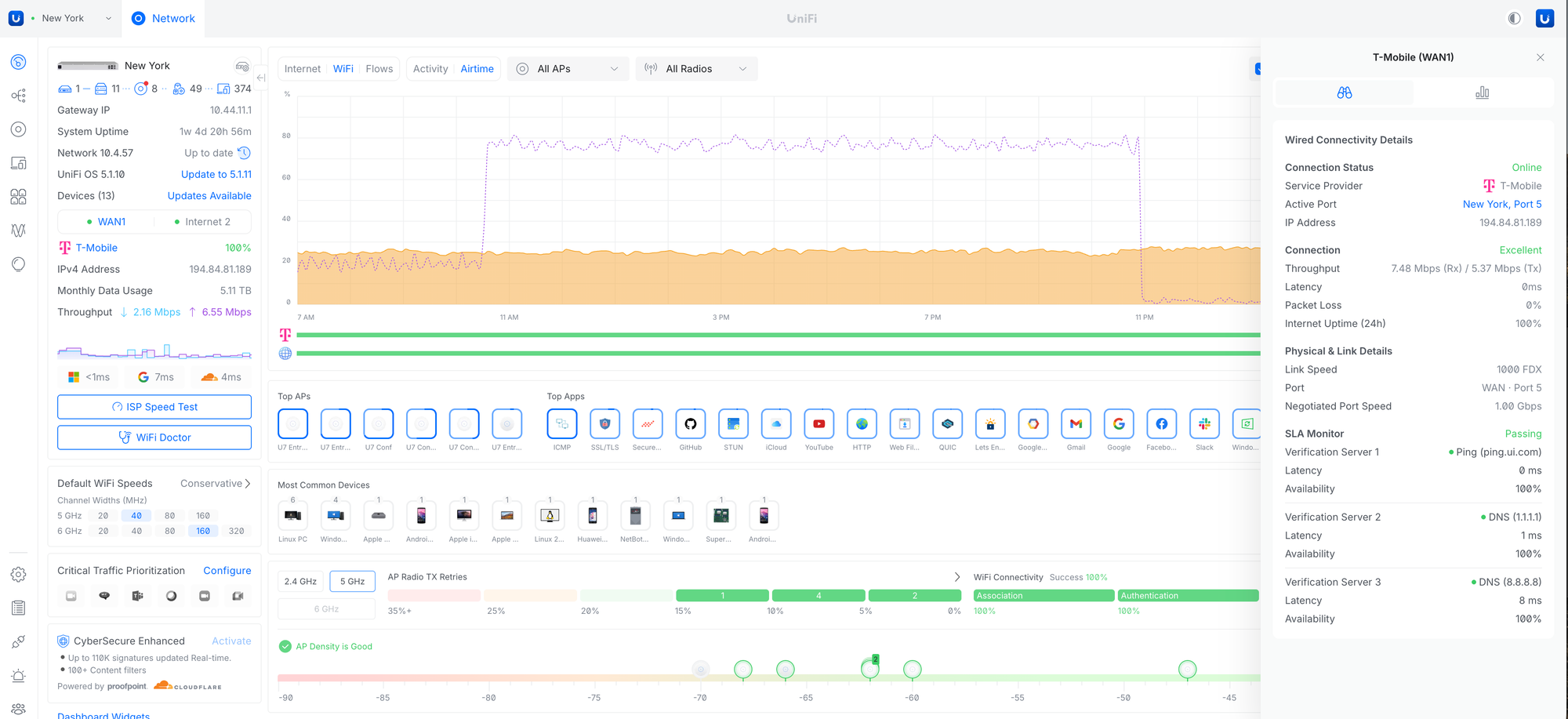
Expanded Dashboard visibility with new WiFi Airtime, Multicast, and WAN health insights, along with improved ISP and 5G monitoring through enhanced connectivity details, SLA visibility, and utilization metrics.
Added WiFi Airtime and Multicast activity graphs to the Dashboard.Improved the WAN and ISP side panel with SLA, latency, packet loss, and utilization insights.Expanded 5G and cellular connection visibility and diagnostics.Requires U5G firmware 7.4.1 or newer.
Routing User Experience/FIB table
Introduced a centralized Routing view for managing and troubleshooting Static, OSPF, BGP, Connected, and Policy-Based routes, along with a unified FIB table that provides visibility into route destinations, next hops, interfaces, metrics, and routing sources across the gateway.
Improvements
Added a Tags column to the Devices page.Added an Installation Date column to the Devices page.Added a warning about data usage before running a Speed Test on 5G WAN.Added an IPv6 Detection banner to the Dashboard.Requires UniFi OS 5.1.8 or newer.Added a Power Sources column to the device list.Added Pro AV and Tagged VLAN columns to Port Manager.Added warnings when VLAN tagging conflicts are detected.Added Time Machine to Infrastructure Topology.Added an option to configure Safe Shutdown Trigger Point and Auto-Recovery power cycle delay.Requires UPS 1.4.30 or newer.Added a suggestion in Infrastructure Topology to set devices as Edge to improve STP convergence.Added a notice when saving Content Filtering exceptions that client-side DNS may cache entries for up to 1 hour.Added support for using UXG-Fiber as an SD-WAN hub.Added the ability to change the VPN gateway netmask when existing clients are present.Added the ability to configure Static and Policy-Based Routes from the Routing section.Added an STP column and filters to the Ports page.Improved feedback in Port Manager and WiFi Broadcast settings when VLAN tagging conflicts are detected.Improved validation for WireGuard IPv6 MTU and MSS settings.Improved SSL certificate generation used in Deep Inspection.Improved Remote Activity Logging by allowing configuration for Gateway, Switch, and Access Point logging.Improved the VPN settings user experience.Improved WiFi Broadcast settings.Renamed Roaming Assistant to Handoff Suggestions (802.11v) and expanded support to 6 GHz.Added new IoT optimization settings, including DTIM Interval Lock and Channel Lock options.Replaced legacy IoT Mode with the new Force WiFi 4 compatibility option.Improved IP display for meshed devices.Improved the VPN connection user experience in the Clients section.Improved Clients page performance when handling large amounts of offline clients.Improved Site Magic connectivity.Improved the Infrastructure Topology Time Machine user experience.Improved the Reset Stats option in Port Manager.It now also clears Last Seen devices.Improved the Zone-Based Firewall policy reordering user experience.Improved the Port Manager settings user experience.Improved application resiliency.Improved WiFi settings validation for Handoff Suggestions (6 GHz).Disabled DNS Assistance when Captive Portal is enabled.Moved Email Services to Control Plane Settings.If a custom email service is used, it must be reconfigured in Control Plane after the update.
Bugfixes
Fixed an issue where view-only admins did not receive email notifications.Fixed an issue where settings provisioning did not occur after device re-adoption in rare cases.Fixed an issue where SD-WAN could fail to sync and new networks could not be created after applying a Blueprint in rare cases.Fixed an issue where U-LTE settings could not be saved in rare cases.Fixed an issue where IGMP Snooping settings could fail to be provisioned in rare cases.Fixed an issue where Port Manager and Device settings could fail to save changes in rare cases.Fixed an issue where flow control settings in Port Profiles could fail to save.Fixed an issue where port forwarding on L3 networks in zone-based firewall rules did not work properly.Fixed an issue where LTE backup settings in VLAN configuration were not respected in zone-based firewall rules in rare cases.Fixed an issue where clients with only a fixed IP and no dynamic IP were missing from the IP table.Fixed an issue where WAN3 port assignment could fail after restoring a backup.Fixed a gateway configuration error when entering an invalid IPv6 range in network settings.Fixed an issue where the UDB Pro mesh parent was not displayed in the side panel.Fixed an issue where LCM night mode settings could fail to save in rare cases.Fixed an issue where third-party clients were missing from Infrastructure Topology.Fixed an issue where navigating to Channel AI could result in a dead end.Fixed an issue where the Captive Portal did not work when connected to a UX7 in Mesh Mode.Fixed an issue where the Etherlighting network option was missing.Fixed an issue where some devices could fail to adopt via UniFi Auto-Link on Cloud Gateways with built-in WiFi when using a WiFi broadcast with a non-default network assigned.Fixed an issue where Multicast Storm Control was not applied from Port Profiles when Pro AV QoS was not in use.
Additional information
UniFi OS Server
Going forward, we recommend users upgrade to UniFi OS Server for all self-hosted deployments. It provides the full UniFi OS Platform experience, ensuring you receive the latest features, improvements, and integrations.
UniFi Network Native Application for UniFi OS
Compatible with UDM, UDR, UDR7, UDR 5G Max, Express, Express 7, and UCG models (Ultra, Max, Fiber, and Industrial) on UniFi OS 3.1.6 or later. UDM-Pro, UDM-SE, and UDW have been using it since UniFi OS 5.1.5.
The UniFi OS update utilizes the application version compatible with your console.The manual update process via SSH requires a compatible package. Incompatible packages will be rejected on installation.Older UniFi OS versions (prior to UniFi OS 3.1.6) on the UDM and UDR continue to utilize the standard UniFi Network Application for UniFi OS.
Checksums
1e8645bfc9679e64e2897e2c55f688ec | UniFi-installer.exe
27b4e4fc85bde4ac5f672a15825a5075 | UniFi-Network-Server.dmg
8d1c0d71632ddae780f9e45433b05790 | UniFi.unix.zip
68e0494402fd99b319d0d6573fdb80a3 | unifi_sysvinit_all.deb
87f15d4faf9938b25dc039bb0071cfb0 | unifi-uos_sysvinit.deb
6ab0ecb599fa20e69a0cfdf46ef08f01 | unifi-native_sysvinit.deb
601df32736f41e40a80a3e472450a3e1 | unifi_sh_api
————————————————————————————————————————
877458ef776a8dbcf2b605e63b3bd69b7f1cc84c8069b650ce97ee619a30cfcb | UniFi-installer.exe
9d6a698ce10643f9fb27c6ca29af346b0791179fba86def41498943162d686ca | UniFi-Network-Server.dmg
7fa8424ad1fc43778872cd14df5a7f70602573d296f4b5a933025fec6df4f2e4 | UniFi.unix.zip
fc378cf8cd2bec3d334bf7b72eabfcd1861e5fae67b9c16735471132105b2072 | unifi_sysvinit_all.deb
a365d0482b0c1eb61b7575689dc70bf93172ec0beb88ae767d115f2bf5db06f5 | unifi-uos_sysvinit.deb
3c500cdd562cbca630aca7f73a57b29d95bbfdee84302a5c23047b3dd36d7143 | unifi-native_sysvinit.deb
1791685039ea795970bcc7a61eec854058e3e6fc13c52770e31e20f3beb622eb | unifi_sh_api
Leave A Comment