UniFi Network Application 10.3.55

Overview
UniFi Network Application 10.3.55 adds Identity Firewall, Improves Device Monitoring, and includes additional improvements and bugfixes.
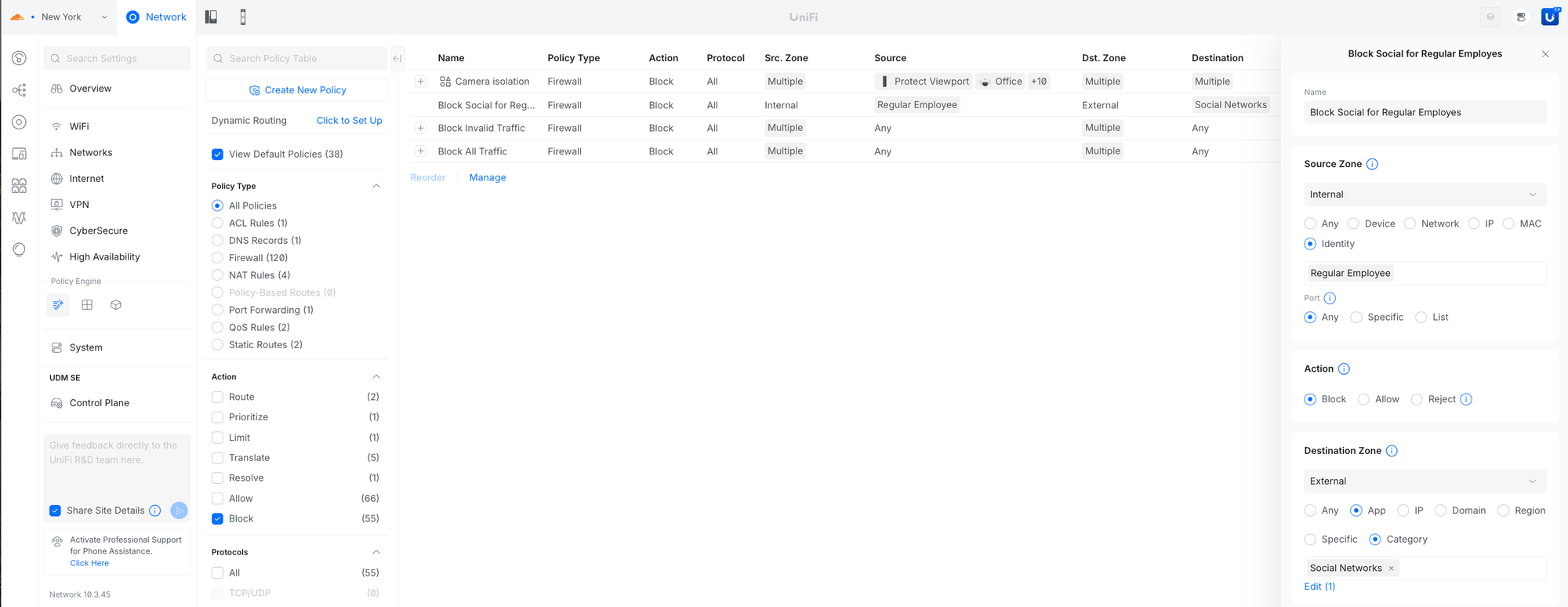
Identity Firewall
Create firewall rules using Identity Roles or individual users to enforce user-based access control independent of IP addresses. Enables consistent policy across devices and simplifies access management as users move between networks.
Requires UniFi OS 5.1 or newer.
Client Devices in Infrastructure Topology & Device Supervisor
Added client device support in Infrastructure Topology and enhanced monitoring for non-UniFi devices (e.g., servers, sensors). Device Supervisor can automatically restart unreachable devices and improves visibility in Topology and Digital Twin.
Improvements
Added OWE support to the WiFi Broadcast and LAG connection support to the Integration API.Added a Device Supervisor filter to the Devices page.Added a DNS Assistance setting to WiFi Broadcast settings to improve DNS resiliency and latency.Requires Access Point firmware 8.6.2 or newer.Added an IPv6 MSS option to VPN Client settings.Added a device status indicator to system logs for multiple devices going offline.Added support for configuring VLANs on UDB/UDB-Pro ports.Added DNS Policy orchestration support.Allowed specifying the method for IKEv2 reauthentication in IPsec VPN settings.Improved MTU validation when IPv4 MSS is configured.Improved IP range validation in QoS and Firewall settings.Improved Time Machine event detection for Ports.Improved the Ports Manager user experience.Improved Port Forward validation to prevent overlap with IPsec site-to-site VPNs.Improved Dashboard Internet statistics accuracy in rare cases.Improved backup restore resiliency.Improved the STP blocked link experience in Infrastructure Topology.Improved WiFi Doctor-triggered device update speed and reliability.Improved DS-Lite over PPPoE by provisioning the correct interface for firewall rules and displaying the correct WAN IPv6 address.Improved the Guest Table to display voucher names.Improved the VPN settings user experience.Increased DS-Lite MTU by 8 bytes.
Bugfixes
Fixed an issue where devices were not reprovisioned when DHCP relay settings were changed.Fixed an issue where packet capture status was not updated when opening an already running capture.Fixed an issue where the UNVR was incorrectly shown in the Clients page when connected via an SFP port.Fixed an issue where the Uplink column on the Devices page was not sorting correctly.Fixed an issue where the IPv6 WAN default route on single-WAN gateways could be incorrectly applied.Fixed an issue where the default route for static IPv6 WAN with a link-local next hop was not applied.Fixed an issue where IGMP Snooping settings could fail to be provisioned in rare cases.Fixed an issue where toggling “Mesh Connect” on a UDB Switch did not apply changes to the device.Fixed an issue where the Port State in Port Manager could be incorrectly represented in rare cases.Fixed an issue where VLAN tagging configuration for In-Wall Access Points could be incorrect in rare cases.Fixed an issue where UDB devices could generate false Meshing system log messages.
Additional information
UniFi OS Server
Going forward, we recommend users upgrade to UniFi OS Server for all self-hosted deployments. It provides the full UniFi OS Platform experience, ensuring you receive the latest features, improvements, and integrations.
UniFi Network Native Application for UniFi OS
Compatible with UDM, UDR, UDR7, UDR 5G Max, Express, Express 7, and UCG models (Ultra, Max, Fiber, and Industrial) on UniFi OS 3.1.6 or later. UDM-Pro, UDM-SE, and UDW have been using it since UniFi OS 5.1.5.
The UniFi OS update utilizes the application version compatible with your console.The manual update process via SSH requires a compatible package. Incompatible packages will be rejected on installation.Older UniFi OS versions (prior to UniFi OS 3.1.6) on the UDM and UDR continue to utilize the standard UniFi Network Application for UniFi OS.
Checksums
cb1c6c51e6c2b28f3f67c516a37671ae | UniFi-installer.exe
2800d36fbd01fa53863e7330dc818759 | UniFi-Network-Server.dmg
b57dc81418fcadab14ed99edb29cac4f | UniFi.unix.zip
e99d4a7679e5ae10a89c8b15741349e6 | unifi_sysvinit_all.deb
64adaeec485ff5c3e457cb41c9a9f5c0 | unifi-uos_sysvinit.deb
a663ddac5e5a55144dbdc145ea932708 | unifi-native_sysvinit.deb
601df32736f41e40a80a3e472450a3e1 | unifi_sh_api
————————————————————————————————————————
06b297e7b1d795ea74e2ab1a299f3b117d8c7460133e7cdba60333fb1d25e60a | UniFi-installer.exe
a74bb3841503f0159adc4217cf224d3a451c3342c0e25a20cf28a1b770a01a15 | UniFi-Network-Server.dmg
f523e5c5c906db3cf6c61dd376eb3d80525511ccc05889840ffd1a7234bb0ce9 | UniFi.unix.zip
da412257d6773e29db6c306134e835019eb5d54d9dacb1ada6673b0ba801fd2f | unifi_sysvinit_all.deb
a690f3ce7c522b83c69c8a889b4bc2f915f813c0bdc30703fa9d85ef238fda8b | unifi-uos_sysvinit.deb
0bcaafd394bc0c0d98b2ea25c4a467b42628ae4d3a88acee391cd48b36978fad | unifi-native_sysvinit.deb
1791685039ea795970bcc7a61eec854058e3e6fc13c52770e31e20f3beb622eb | unifi_sh_api
Leave A Comment