UniFi Network Application 10.1.83

Overview
UniFi Network Application 10.1.83 enhances high availability and system logging, adds new connectivity insights, and includes additional improvements and bug fixes.
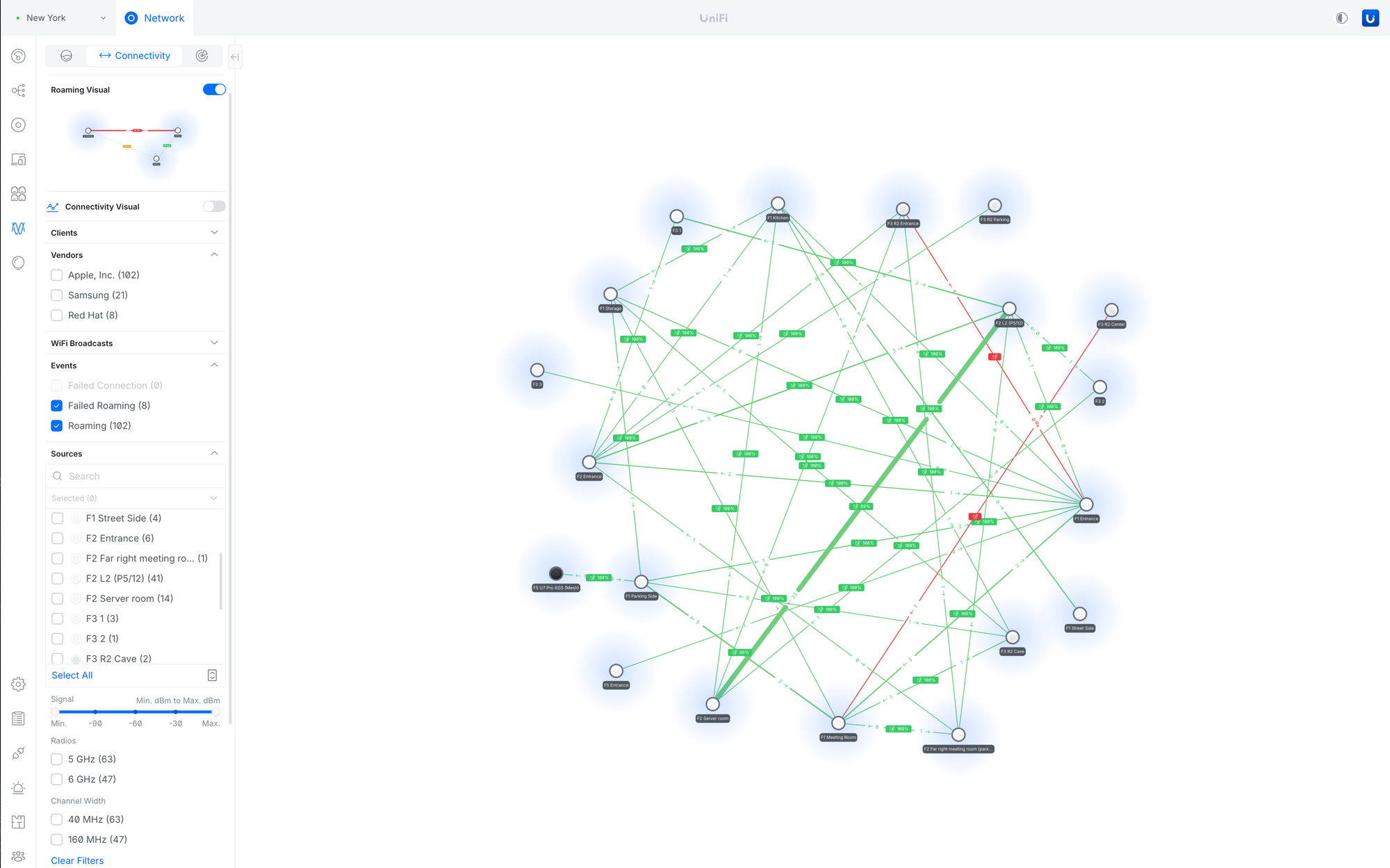
Added Connectivity Insights
Added a new Connectivity section to the Radio view, visualizing client roaming journeys across access points.Provides granular filtering by source and destination (signal strength, radio band, channel width, device tags, and more).Helps identify AP density gaps and optimize assisted handoff for improved roaming and overall network performance.
Improved the High Availability setup user experience
Optimized Shadow Mode (VRRP) setup steps with more guided instructions.Streamlined the MC-LAG configuration flow for a more straightforward setup.
Improved System Logs
Added an Audit filter with admin-based filtering.Added logs for Access Point meshing.Improved log categorization.Introduced Client and Device filters.
Improvements
Radios
Added Total Multicast TX Packets in the AirView charts.Added Access Point Filter to the Airview Radio section.Added AirTime charts in the Radio section panels.Added Avg. Interference and Avg. AirTime columns to the Radio page.Added the Active Client distribution diagram in the Radio side panel.Added packet capture results download as a text file or copy to clipboard.
WiFi & Access Points
Added 6GHz WiFi experience in the AP side panel.Added “Show Access Point name in Beacon” to the WiFi Settings.Added Statistics Charts to the Access Points side panel’s Insights tab.Added a notice suggesting disabling Mesh Connect for Access Points with a Wired Uplink.Added WiFi usage chart in the Clients page.Added WiFi Doctor on the Dashboard.Added confirmation tooltip for “Override All APs” in Roaming Assistant.Added a Warning when changing from WPA3 to WPA2/3 Security in the WiFi settings.Improved the user experience for the meshed AP side panel.Improved the user experience for AirTime Utilization in the AP side panel.Improved the Most Active Client widget in the AP side panel.Improved the WiFi Broadcasting Settings user experience.Moved the WiFi Client Ping test to the Client side panel.Moved Wireless Client Airtime Graph to the Client side panel.Moved AirTime charts to the AP Insights panel.Moved Packet Capture to the Radio Section.
Dashboard
Added messaging to upgrade to UniFi OS Server on UniFi Network Servers.Added Starlink Firmware status and obstructions details to the Dashboard.Starlink router must be directly connected to the UniFi Gateway.The 192.168.100.0/24 subnet cannot be used on the local network.Added a notice about the available update to the Dashboard.Improved the Dashboard user experience for multiple WAN setups.
Port Manager & Devices
Added the Release Notes button in the device table.Added Device Model and Firmware Version details in the Port Manager left panel.Added Port Warnings in the Port Side Panel Settings tab for better visibility.Added device compliance information in the device side panel.Allow clicking on the Connection Column to open the Client/Device panel in Port Manager.Improved the Port Manager user experience for offline devices.
Networking, SD-WAN & VPN
Added support for MTU/MSS settings for SD-WAN, VPN Servers, and VPN Clients.Added information for LAG ports to use the same speeds on both ends to prevent performance degradation.Improved the Link Aggregation removal user experience.Improved the MC-LAG user experience.
Validation & Safety
Added validation for Loopback IP addresses in the Network Settings.Improved validation across the Settings pages.
API
• Added various new endpoints to the Network API:
Device Removal.UniFi Device Adoption.Wireless Device Adoption.DNS policy creation and management.Firewall policy creation and management.Listing VPN servers and Site-to-Site tunnels.
Performance & Reliability
Added automatic removal of older firmware when new firmware is cached.Improved latency for applying configuration changes.Improved backup restore resiliency.Improved application stability.
Others
Added sorting for the Hotspot Voucher table.Added Device Tags.Requires UniFi OS 5.0 or newer.Added the option to expand Long List Filters to full height for better usability.Added PDU Power Actions in Alarm Manager.Improved the Topology user experience for larger setups.Improved the AirTime Utilization charts user experience.Improved the device adoption user experience.Improved the user experience for configuring static IP addresses for devices.Moved Network Lists and RADIUS Servers to the Networks settings.Removed the Interface Refresh Rate Field setting.It’s now always automatically adjusted.Removed the Network Application backup option.You must now use the backup option within Control Plane.Renamed DHCP Manager to IP Table.
Bugfixes
Fixed an issue where the LED settings weren’t taking effect on some Access Points in rare cases.Requires Access Point firmware 8.5.0 or newer.Fixed an issue where the Guest Network option wasn’t available on sites that don’t use Zone-Based Firewall.Fixed the inability to remove offline UPS devices.Fixed an issue where users could configure RADIUS DAS/DAC when not all requirements were met.Fixed an issue where not all places were using the same ISP logos.Fixed an issue where the 5GHz Roaming Assistance toggle wasn’t working correctly.Fixed an issue where the WiFi blackout scheduler could incorrectly select specified time ranges in rare cases.Fixed an issue where the Add Voucher button wasn’t available for the Hotspot Operators.Fixed inconsistent data reporting between the Network Application dashboard and the Site Manager ISP Viewer.Fixed an issue where the WiFi MAC Filter values were cleared after toggling MAC Filtering.Fixed an issue where System Statistics didn’t report for 5G devices.Fixed an issue where Intrusion Prevention could be disabled after suppressing signatures in rare cases.Fixed an issue where Orchestration WiFi with PPSK enabled could fail to apply in rare cases.
Additional information
UniFi OS Server
Going forward, we recommend users upgrade to UniFi OS Server for all self-hosted deployments. It provides the full UniFi OS Platform experience, ensuring you receive the latest features, improvements, and integrations.
UniFi Network Native Application for UniFi OS
A specific application version that is only compatible with the UDM, UDR, UDR7, Express, Express 7, UCG-Ultra, UCG-Max, and UCG-Fiber (running UniFi OS 3.1.6 or newer).
The UniFi OS update utilizes the application version compatible with your console.The manual update process via SSH requires the use of a compatible package. Incompatible packages will be rejected on installation.Older UniFi OS versions (prior to UniFi OS 3.1.6) on the UDM and UDR continue to utilize the standard UniFi Network Application for UniFi OS.
Checksums
5f082bbae109e3ca3dcc9ad9ddce60a1 | UniFi-installer.exe
b9492909efcabd785ceeedabb1fb41fc | UniFi-Network-Server.dmg
aa7cc5119c4af919512f23bb4764606b | UniFi.unix.zip
09066e92c85b41a1d1fbb048036c7864 | unifi_sysvinit_all.deb
c5bec9f7a00a7e3ab85d4c3d1711707b | unifi-uos_sysvinit.deb
6b44af9a906145b6eec0fc24e68a3f99 | unifi-native_sysvinit.deb
601df32736f41e40a80a3e472450a3e1 | unifi_sh_api
————————————————————————————————————————
694f819feaeff6a7f897256805ff49e80ca8b775a22622ac4409d248aa7d18de | UniFi-installer.exe
967f80cfb46e57415cf3f8ae6784944eab96d7ca74c07e77d312746ecbf82fbc | UniFi-Network-Server.dmg
df7a918e78a1196817d518642940a1d5a085fe4b5e8c97dba6026650bbf22e75 | UniFi.unix.zip
5fc78210cfa1dad7254f82c6abd5730363a614a17a2d5cc200b61273b07fd8d5 | unifi_sysvinit_all.deb
c7128785c90e14a765c350787626c823f73b7e3a2108dba864e82a7b4b825442 | unifi-uos_sysvinit.deb
45ec24a23df3fcec0f98beada0c56bee86ebae4c0a8deb4ddd94adb0741b8f94 | unifi-native_sysvinit.deb
1791685039ea795970bcc7a61eec854058e3e6fc13c52770e31e20f3beb622eb | unifi_sh_api
Leave A Comment